
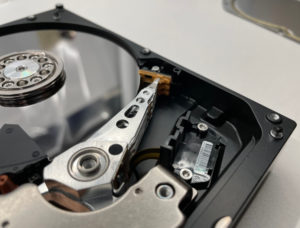
The HDD actuator (Hard Disk Drive actuator) is the mechanical component that positions the read/write heads over the magnetic platters to access your data.
It’s similar in design to the arm of a record player, except that the read/write heads float just above the platters. They don’t make direct contact unless something goes terribly wrong (in which case, data loss is likely — view some pictures of severe platter damage from past Datarecovery.com cases).
When the HDD actuator fails or becomes misaligned, your computer loses the ability to find or retrieve information. In this article, we’ll describe how the actuator functions, how it interacts with other drive components, and how professional data recovery engineers address actuator-related damage.
How the HDD Actuator Accesses Data
Inside every traditional hard drive, data is stored on spinning circular disks called platters, which are further subdivided into tracks. To retrieve a file, the drive must move its read/write heads to the exact track that contains the data. The actuator is the motor and arm assembly that handles this movement.
Modern drives use a Voice Coil Motor (VCM) to power the actuator. Unlike older stepper motors (which moved in fixed increments), a VCM uses electromagnetic force to swing the arm back and forth with fluid precision.
A copper coil is positioned between two powerful permanent magnets. When electricity flows through the coil, it creates a magnetic field that interacts with the magnets to move the arm.
Key Components of the Actuator Assembly
Since this is a data recovery blog, we’re primarily interested in HDD actuators when they fail. And to understand how a drive fails, it helps to understand the individual parts that make up the actuator assembly:
- The Actuator Arm: A rigid metal piece that extends over the surface of the platters.
- The Slider: A tiny structure at the end of the arm that carries the read/write head. It is designed to fly on a microscopic cushion of air created by the spinning platters (a height often smaller than the width of a fingerprint).
- The Flex Cable: A thin, flexible ribbon cable that carries electrical signals from the drive’s main circuit board to the heads.
- The Pivot: The central bearing around which the entire arm rotates.
Because these parts move at high frequencies, they’re susceptible to wear and physical shock. If a drive shows any signs of an actuator failure, it’s important to turn the drive off immediately and contact a professional data recovery provider.
Why Actuator Failures Lead to Data Loss
Most mechanical hard drive failures involve the actuator or the heads it carries. Every day, our engineering teams work on HDD data recovery cases where the actuator has become stuck, or the heads have been physically damaged.
When the drive’s firmware detects that the actuator cannot reach its target or calibrate correctly, it may attempt to reset the arm repeatedly. This creates the rhythmic “click, click, click” sound often referred to as the click of death.
Recovering data from a drive with a failed actuator requires a controlled environment and specialized tools. Because the internal components are sensitive to microscopic dust particles, these repairs must be performed in a Certified ISO Class 5 Cleanroom.
Head Stack Replacement
When an actuator or its heads fail, engineers must perform a Head Stack Assembly (HSA) replacement. This involves finding a “donor” drive that is a perfect match for the failed unit — matching the model number, firmware version, and often the site of manufacture.
We then carefully move the functional actuator from the donor into the patient drive using precision tools designed to keep the heads from touching each other.
Servo Calibration and Firmware Repair
Hard drives use servo information — specialized markers embedded on the platters — to help the actuator stay on track. If the new actuator is slightly misaligned, the drive’s firmware must be manipulated using specialized hardware tools to accept the new components.
Hard Drive Data Recovery Services
At Datarecovery.com, we utilize purpose-built tools and proprietary software to restore data from damaged hard drives. As a leader in our industry, we’ve recovered tens of thousands of cases for personal computer users, enterprises, and organizations of all sizes.
Our process includes risk-free evaluations and a comprehensive no data, no charge guarantee: If we’re unable to recover the files you need, there’s no charge for the attempt.
If your hard drive is clicking or failing to spin up, we’re here to help. Contact Datarecovery.com for a free evaluation or call us at 1-800-237-4200 to speak with a recovery specialist.


