
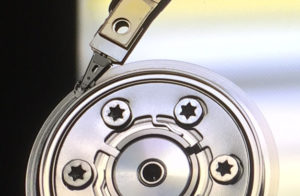
The platters and actuator heads of a hard drive.
A device which does not exist was specified is a critical Windows error that occurs when the operating system loses its hardware connection to a storage device in the middle of a task.
When this message appears, the communication link between your computer and the hard drive, SSD, or USB flash drive has been severed. It’s sometimes associated with the following error code: Error 0x800701b1.
If you haven’t backed up important files on the device, we recommend treating this error message as a serious data loss event; even if your system has relatively minor errors, taking the wrong action could put your data at risk. Contact a professional data recovery provider as soon as possible.
Below, we’ll explain why the error message occurs and a few steps you can try to fix it. To speak with an expert, call 1-800-237-4200 or submit a ticket online.
Why “A device which does not exist was specified” Occurs
In basic terms, Error 0x800701b1 indicates that at a low level, the computer’s handshake with the storage device has failed. The operating system can’t determine why this is occurring — otherwise, it’d probably fix it — but devices can lose their connection for various reasons including:
- Physical Component Failure: The internal read/write heads or the controller chip on the drive’s circuit board may have failed, causing the drive to drop off the system.
- Insufficient Power: External drives, particularly large desktop models, may throw this error if the USB port or power adapter isn’t providing enough steady voltage to keep the platters spinning or the flash memory active.
- Failed Bridge Chips: In external enclosures, the chip that converts SATA to USB can fail; the computer sees the bridge, but the actual device (the drive) is gone.
- Loose or Damaged Cabling: A damaged SATA cable or a loose USB header can cause intermittent connection drops that trigger this specific wording from Windows.
We’d start with the loose or damaged cabling — do not start by running logical repairs.
Troubleshooting “A device which does not exist was specified”
To reiterate, if the data on the device is important, contact a data recovery company. You generally get one chance to recover your data — the steps you take after a media failure can certainly influence the chances of a successful case result (as well as the cost of the recovery).
Reputable data recovery providers will offer free or low-cost evaluations for most common storage devices. At Datarecovery.com, we provide free standard evaluations for hard disk drives (HDDs), solid-state drives (SSDs), and a variety of other devices. We also support our services with a no data, no charge guarantee: If we’re not able to recover the files you need, you don’t pay for the attempt.
With that out of the way, here’s a basic action plan for resolving this error:
- Check Physical Connections: Replace the USB or SATA cable and try a different port (preferably one directly on the motherboard rather than a front-panel port or a hub).
- Verify Power Requirements: If you are using an external drive, ensure it is plugged into a wall outlet rather than relying solely on USB power. You might also try removing the device from its enclosure (assuming that the device supports this) and plugging it in directly — but don’t do this unless you’re comfortable with the process.
- Inspect Disk Management: Open the Windows Disk Management utility to see if the drive appears as “Unallocated” or “Not Initialized.” If you need the data, do not format the drive or initialize the disk if the computer prompts you to do so.
- Rescan Disks: Within Disk Management, use the Action menu to select “Rescan Disks,” which forces Windows to look for hardware changes.As this Reddit thread notes, this can sometimes force Windows to re-establish a lost connection with an M.2 or SATA drive.
- Test on an Isolated System: Plug the drive into a completely different computer to see if the error follows the device or stays with the original PC.
Professional Data Recovery Resources
When the operating system cannot communicate with a storage device, standard data recovery software is useless. Software requires a stable hardware connection to function; if the device does not exist to Windows, it does not exist to the software.
Data recovery engineers can diagnose the underlying issue and develop a nondestructive strategy for recovery. If your drive has disappeared and you cannot afford to lose the files, we’re here to help.
Submit a case online or call us at 1-800-237-4200 to start your free evaluation.


