
NAND cell read disturb is a rare failure scenario that affects flash storage devices including (but not limited to) solid-state drives (SSDs).
Unlike a mechanical head crash or a firmware brick, read disturb is a form of data corruption. It occurs when the act of reading data from a cell inadvertently changes the charge of neighboring cells.
Here’s a look at why this happens and how it impacts data integrity. If you’ve lost data from an SSD, USB drive, or any other flash device, we’re here to help. Call 1-800-237-4200 to set up a risk-free evaluation or open a ticket online.
How NAND Flash Stores Data
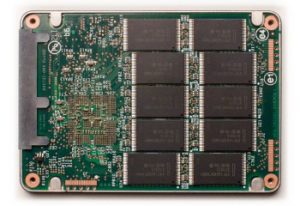
First, we need a basic grasp of how NAND flash functions. If you’ve got a good idea, you can safely skip this section (and if we’re not going into enough detail here, we’ve got other articles with more details. Read: How Do Solid State Drives Store Data?).
Here are the basics: In NAND, data is stored by trapping electrons within a floating gate (or a charge trap) in a transistor. The presence or absence of these electrons determines the voltage level of the cell, which the controller interprets as binary data.
In other words, the presence of an electron serves the same purpose as a magnetic charge on a hard drive. Hard drives can store data sequentially, with one magnetic charge after another (that’s not how it always works, but that’s a topic for another article).
However, flash memory is organized into a hierarchy: cells make up pages, and pages make up blocks. While you can read and write data at the page level, you can only erase data at the block level. That’s why flash devices have wear-leveling algorithms that optimize how pages are written and how blocks are erased.
What Causes NAND Read Disturb?
When you want to read a specific page of data, the SSD controller applies a specific voltage to the wordline associated with that page. However, to complete the circuit and read that specific row, the controller must also apply a lower pass-through voltage to all the other rows in the same block.
The pass-through voltage is essentially a weak programming operation. If you read from the same block millions of times without ever erasing it, those small electrical stresses begin to accumulate. Eventually, enough electrons leak into neighboring cells to change their threshold voltage.
The result? A cell that was supposed to be a 0 is suddenly read as a 1. That’s data loss — but if it happens to a single cell, it probably won’t cause a big issue.
Why Modern SSDs Face Greater Risks
Read disturb has always been a theoretical risk, but it’s now a practical concern due to two major trends in storage manufacturing:
- Cell Density: As manufacturers shrink the distance between cells to increase capacity, the insulation between those cells becomes thinner. That makes it easier for the electrical field of one cell to disturb its neighbor.
- Layering (TLC and QLC): Triple-Level Cell (TLC) and Quad-Level Cell (QLC) drives store multiple bits per cell by using very precise voltage levels. Because the gap between different states is so small, even a tiny amount of electrical leakage from a read disturb can push a cell into the wrong state.
This is sort of a mirror of the issues facing high-density hard drives that use technologies like Shingled Magnetic Recording (SMR) and Heat Assisted Magnetic Recording (HAMR); as data density increases, precision becomes more important, and there are more opportunities for data loss to occur.
SSDs Are Designed to Limit Read Disturb
Fortunately, SSD controllers are designed with read disturb in mind. They use several techniques to mitigate the risk:
- Error Correction Code (ECC): When a read disturb causes a few bit-flips, ECC can usually detect and correct them on the fly. Hard drives also use ECCs, by the way.
- Read Refresh: Advanced controllers keep track of how many times a specific block has been read. Once it hits a certain threshold, the controller will move the data to a fresh block and erase the old one.
- Wear Leveling: As we mentioned earlier, SSDs are designed to ensure that no part of their memory receives too much of the workload. By constantly moving data around, the controller spreads out the read/write cycles.
In other words, SSDs have techniques to stop read disturb from occurring and to stop occasional read issues from causing data loss. They’ve got some basic redundancy built in.
When Read Disturb Leads to Data Recovery
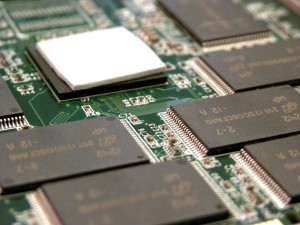
Read disturb causes noticeable data loss when the number of bit-flips exceeds the controller’s ECC capabilities. That usually happens in cold storage scenarios — for example, a server that is read constantly but rarely written to — or when a drive’s firmware is poorly optimized for high-density NAND.
Once the controller can no longer correct the errors, you may see CRC Errors or I/O Device Errors. At this stage, the data is still physically there, but the logical structure isn’t readable.
In our laboratories, we address these cases by bypassing the failing controller. Our engineers can perform a chip-off recovery when absolutely necessary, reading the raw data directly from the NAND chips. We then use proprietary algorithms to reverse-engineer the controller’s wear-leveling and ECC logic, allowing us to manually reconstruct the files.
We should stress that read disturb is a form of corruption, and it’s difficult to diagnose as anything other than — well, “data corruption.” You probably won’t get an evaluation report that cites read disturb as the cause of data loss; from a data recovery perspective, all we can say is that corruption has occurred.
How to Prevent NAND Read Disturb on an SSD
The best way to prevent read disturb is simple: do not use an SSD as a long-term storage solution that remains unpowered or unmonitored for extended periods. If you have a drive that is rarely written to, it is a good practice to occasionally rewrite the data or run a manufacturer-approved diagnostic scan that forces the controller to check for and refresh weak cells.
It’s also worth noting that no SSD technology is perfect, and all storage devices eventually fail. If the only copy of your data is on an SSD — or a hard drive, or a flash drive, or even a RAID array — your data is at risk. Keep at least three copies of all important data.
If your drive is already showing signs of corruption — such as files that won’t open or folders that have disappeared — stop using the device immediately. Each additional read attempt could exacerbate the data loss.
Need assistance with a failing SSD or flash drive? We provide risk-free evaluations and a no data, no charge guarantee. Call us at 1-800-237-4200 to speak with an engineer or submit a case online to get started.