
According to the 2025 Data Breach Investigations Report from Verizon, ransomware was present in 44% of all analyzed breaches over the past year — a sharp increase from 32% in 2024.
When an infection occurs, the first step is to name the threat. Identifying the variant can reveal which vulnerabilities were likely exploited, available decryption options, and the extent of the attack (whether data was exfiltrated and so on).
At Datarecovery.com, we help organizations recover from ransomware attacks. If you’re currently facing an active infection, call us at 1-800-237-4200 to speak with an expert or set up a case online.
Below, we’ll outline the steps you should take to identify a ransomware variant. Note that this isn’t a perfect list — we’ve seen sophisticated attackers mimic the methods of other ransomware gangs, so for a positive ID, you may need to work with an experienced ransomware recovery provider.
1. Analyze the File Extensions
Most ransomware variants rename your files after encryption by adding a specific string of characters to the end of the filename. While some modern variants use randomized extensions to evade simple detection, many prominent groups continue to use consistent markers:
- .akira: This extension is the hallmark of Akira ransomware, which emerged in early 2023 and claimed approximately $244 million in proceeds by late 2025. It’s still an active variant, despite efforts from CISA.
- .cactus: A common marker for Cactus ransomware, which frequently targets vulnerable VPNs.
- .play: Used by the Play ransomware group, which has increasingly leveraged supply chain gaps and unpatched external services in 2025.
- .lockbit: Associated with the LockBit family, a long-standing Ransomware-as-a-Service (RaaS) operation that remains active despite law enforcement disruptions.
- .locked: Often seen in mobile-based attacks like DroidLock, which blocks user access to the device screen rather than encrypting underlying files.
This is a small subset of known file extensions; since the file extensions are meaningless other than as a marker, they can be virtually anything. Write down any file extensions that indicate ransomware infection, then disconnect the infected machines ASAP.
2. Examine the Ransom Note
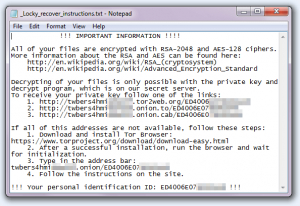
Extensions may be randomized, but most variants also contain a ransom note that provides a clear indication of the attacker. These files are typically dropped into every encrypted directory and might be named something like README.txt, DECRYPT_FILES.html, or RESTORE_FILES.txt.
The visual style of the note and the payment portal can be diagnostic. For example, Akira’s portals are known for a distinct retro green-on-black aesthetic. Groups like ALPHV (BlackCat) often use more corporate-style negotiation panels and may include threats of Distributed Denial-of-Service (DDoS) attacks as part of a triple-extortion strategy.
Most notes also include a victim ID, which specialists use to determine if a specific decryption key can be recovered from volatile memory or previously known leaks.
3. Identify Indicators of Compromise (IOCs)
Forensic experts look for Indicators of Compromise (IOCs), which are artifacts such as specific IP addresses, registry keys, or malicious scripts.
Akira threat actors, for instance, are notorious for abusing remote access tools like AnyDesk and exploiting specific vulnerabilities such as CVE-2024-40766 in SonicWall products for initial access.
If your VMware ESXi virtual machines were targeted, it points toward sophisticated variants like Akira or BlackCat, which have specialized Linux versions designed to encrypt hypervisors. Other variants may use “use-after-free” flaws like CVE-2024-1086 to gain root control over Linux servers.
4. Preserve Critical Forensic Logs
To accurately identify a variant and close the security hole, you must preserve logs before they are overwritten or deleted by the malware’s cleanup scripts. In 2025, data exfiltration occurs in roughly 76% of ransomware incidents, making these logs vital for breach notification compliance.
Ensure your team captures:
- Windows Event Logs: Look for service installations (Event ID 7045) or the clearing of security logs, which indicates an attempt to hide tracks.
- Firewall and VPN Logs: These can reveal the attacker’s point of entry and the IP addresses used for command-and-control (C2) communication.
- PowerShell History: Many variants use obfuscated PowerShell commands to move laterally across the network or disable antivirus software.
- MFT and NTFS Journaling: Analyzing the Master File Table (MFT) helps determine the exact second encryption began and which files were modified first.
Professional Support for Ransomware Identification and Recovery
Paying for ransomware is sometimes illegal, and it’s not always effective: About 1 in 4 ransomware victims who pay do not receive access to their files.
At Datarecovery.com, we provide forensic recovery options to restore operations after ransomware attacks — without paying the ransom. Our engineers use proprietary hardware and software to rebuild files and bypass encryption where possible.
Get started with a risk-free evaluation. Call 1-800-237-4200 or submit a case online.