
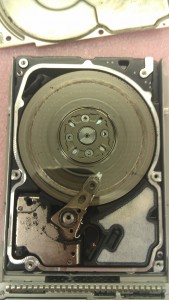
When a hard drive stops working, it’s typically for one of two reasons: a mechanical failure or an electronic failure. In a mechanical failure, the moving parts inside the drive — commonly the HDD actuator (Hard Disk Drive actuator) or the spindle motor — have malfunctioned. In an electronic failure, the PCB (Printed Circuit Board) or the internal firmware has been compromised.
Today, we’ll discuss the common symptoms for each category of failure. First, an important note: While the symptoms below can provide a general idea of what went wrong, it is important to understand that these signs often overlap.
For example, a drive that won’t spin could have a dead circuit board, or it might have a seized motor. It’s impossible to determine the exact cause of a hard drive failure without a physical inspection — that’s one of the reasons that we provide risk-free evaluations for all hard drive data recovery services.
To set up a free evaluation, get started online or call 1-800-237-4200 to speak with an expert.
Identifying Mechanical Hard Drive Failures
Mechanical failures involve the physical moving parts inside the drive. Because these components operate with microscopic precision, even a small amount of physical shock or wear can lead to a crash.
All hard drives eventually fail — just as every mechanical device will eventually break down over time. It’s worth noting here that solid state drives (SSDs) don’t have mechanical components, but they’re still susceptible to eventual data loss due to the limits of flash storage write cycles.
Most mechanical hard drive failure symptoms are sounds:
- Rhythmic Clicking: Sometimes called the “Click of Death,” this sound usually indicates that the actuator is unable to find the servo markers on the platters. The arm sweeps back and forth, hitting its physical limiter as it tries to calibrate.
- Grinding or Screeching: These sounds suggest that the read/write heads are physically contacting the platters. This is a head crash, and it can cause permanent data loss by removing the magnetic layer where your data is stored.
- A High-Pitched Whining Sound: Often indicates that the spindle motor bearings are seizing. If the platters cannot spin at the required speed (5,400 or 7,200 RPM for most drives), the heads cannot fly and the drive will not initialize.
- A Beeping Sound: While hard drives don’t have speakers, a stuck actuator arm can cause the motor to emit a faint, rhythmic beeping or pulsing sound as it tries (and fails) to spin the platters.
Mechanical failures are frequently caused by physical impact or simply the age of the drive. Once a drive starts making any of these sounds, the chance of a DIY recovery is essentially zero. Any further power cycles can cause permanent, circular scratches on the platters called rotational scoring.
The image to the right shows a hard drive with severe rotational damage. Once the magnetic material that stores your data is physically
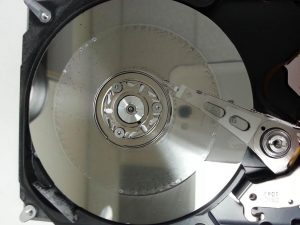
removed from the drive, there’s no getting it back — the data is permanently lost.
If your hard drive is inaccessible for any reason and you need the files, turn it off immediately. Don’t risk permanent data loss.
Identifying Electronic Hard Drive Failures
Electronic failures occur on the PCB (the circuit board on the bottom of the drive) or within the drive’s firmware. An electronic issue prevents the drive from communicating with your computer, even if the internal mechanical parts are perfectly healthy.
With that said, electronic issues and mechanical issues often overlap. If the electronics aren’t functioning properly, they may send bad operating instructions to said mechanical components — so an electronic failure isn’t necessarily less severe or easier to fix than a pure mechanical issue.
Signs of electronic hard drive issues include:
- No Sign of Life: If the drive does not spin, vibrate, or make any sound at all when connected to power, it’s a fairly good indication of a PCB issue.
- The Smell of Smoke: A power surge or the use of an incorrect power cable can fry the components on the board.
- Incorrect Drive Identification: If your computer recognizes the drive but lists the capacity as 0MB or gives it a strange name (like “Factory Alias” or “Generic ROM”), the internal firmware may be corrupt.
- Extremely Slow Performance: Sometimes an electronic failure manifests as a busy state where the drive’s controller is overwhelmed by internal errors. When that’s the case, your computer might freeze when the drive is plugged in.
So, if your hard drive has an electronics issue, can you simply swap the PCB?
Absolutely not! Most boards contain a unique ROM chip with adaptive data specific to that individual drive’s mechanical tolerances. Swapping boards without moving this chip can cause permanent data loss.
To learn more, read: Why You Can’t Swap PCBs to Fix a Hard Drive
Professional Resources for Hard Drive Data Recovery
Many symptoms are deceptive; for instance, a firmware error (electronic) can cause a drive to click exactly like a head failure (mechanical). Generally, you have one opportunity to recover data from a hard drive; attempting the wrong fix will waste that chance.
We provide risk-free evaluations for all hard drive data recovery cases, along with a no data, no charge guarantee: If we’re unable to recover the files you need, there’s no charge for the attempt.
With extensive hardware inventories, certified cleanrooms, and decades of experience, Datarecovery.com provides real results for enterprises, home computer users, and everyone in between. Call us at 1-800-237-4200 to speak with an expert or set up a case online.