 DroidLock is a newly discovered Android malware variant that hijacks your device’s screen and threatens to wipe your personal data unless a ransom is paid. The most effective way to avoid infection is to strictly limit app installations to the Google Play Store and carefully scrutinize any app requesting Accessibility Services permissions.
If you have lost access to critical data due to a malware attack or a factory reset, we’re here to help. Set up a risk-free evaluation online or call 1-800-237-4200 to speak with an expert.
What Is DroidLock and How Does It Work?
First identified by security researchers at Zimperium and reported by Tom’s Guide, DroidLock is a sophisticated trojan that disguises itself as a legitimate application. It typically spreads through phishing websites or third-party app stores.
Once installed, the malware tricks you into granting Accessibility Services permissions. These permissions are designed to help users with disabilities, but in the hands of DroidLock, they allow the software to automatically grant itself further privileges — such as access to your camera, microphone, and file system — without your interaction.
The malware then launches a lock screen attack. It covers your display with a persistent overlay mimicking a system update or a login screen that prevents you from accessing your apps or settings. The attackers demand a ransom payment and threaten to factory reset your device if you do not comply.
Does DroidLock Encrypt Your Files?
DroidLock does not encrypt your data; it simply blocks you from reaching it.
That’s an important distinction. DroidLock behaves differently than traditional ransomware like Akira or LockBit. Those ransomware variants encrypt your files so that they’re unreadable without a decryption key.
Note: But while the malware doesn’t encrypt your data, it’s still a serious threat: DroidLock has the capability to execute a remote command to wipe the device, permanently deleting photos, videos, and documents.
Because the files are technically intact behind the lock screen, data recovery is often possible if the device can be isolated before a wipe command is executed.
An Action Plan for Prevention
Avoiding DroidLock requires a strategic approach. The malware relies on social engineering, so take these steps to avoid infection:
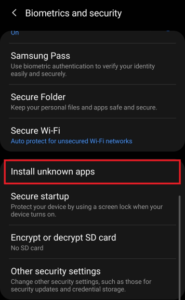
- Stick to Official Sources: Only download applications from the Google Play Store or other reputable sources. If you’re downloading an APK from another source, double-check the site’s credentials (particularly the URL) before installing.
- Scrutinize Permissions: Be extremely skeptical of any utility, game, or productivity app that requests Accessibility Services. If a calculator app asks for deep system control, it doesn’t need it — deny the request and uninstall it immediately.
- Keep Your OS Updated: Security patches often close the loopholes that malware exploits.
- Watch for “Update” Prompts: If an app suddenly claims you need to install a special update from a website rather than the store, be skeptical.
What To Do If Your Android Device Is Infected
If you encounter the DroidLock screen overlay, do not pay the ransom. There is no guarantee the attackers will unlock your device, and paying incentivizes additional attacks.
- Disconnect Immediately: Turn off Wi-Fi and cellular data to sever the connection to the attacker’s Command and Control (C2) server. This may prevent them from sending the wipe command.
- Attempt Safe Mode: If the data on your phone isn’t backed up, we strongly recommend working with a data recovery provider. However, if you intend to recover the data on your own (and be aware, you’ll most likely have one chance at a successful recovery), use Safe Mode to prevent third-party apps from running.
- Consider a Factory Reset: If you cannot bypass the screen, a factory reset will remove the malware. However, this will also erase your data.
Note: If your data is valuable and you have not backed it up, do not perform a factory reset yourself. The process triggers the TRIM command on your device’s flash storage, which can make subsequent data recovery impossible.
Professional Solutions for Android Ransomware Recovery
Datarecovery.com provides extensive services for ransomware recovery, including services for Android and iOS devices. We support our services with a no data, no charge guarantee: If we cannot successfully recover the files you need, you pay nothing for the attempt. Our engineers have decades of experience navigating the complexities of mobile malware and flash storage recovery.
Get help with Android ransomware. Submit a ticket online for a free estimate or call us at 1-800-237-4200 to speak with a malware recovery expert.